What Managers Need From a Contractor Dashboard
A good contractor dashboard answers a manager's questions in seconds. Here is what to put on it, what to leave off and how to keep the figures trustworthy.
Managers who look after contractors rarely have time to dig through records. They need to open a screen and know within seconds whether anything needs their attention, how hours are tracking and whether anything looks unusual. A dashboard that does this well saves repeated questions. One that is cluttered or unclear gets ignored.
This article sets out what managers actually need from a contractor dashboard and how to judge whether yours is helping.
Start with the questions managers ask
Before choosing widgets, list the questions your managers ask most often. A dashboard that answers these directly is more useful than one that shows everything available. In most teams the questions look something like these.
- Who still needs to submit a timesheet for this period?
- What is waiting for my approval?
- How many hours have my contractors worked this week or month?
- Are any contractors working far more or less than expected?
- What expenses have been claimed, and are any unusual?
Key figures first, then trends, then actions
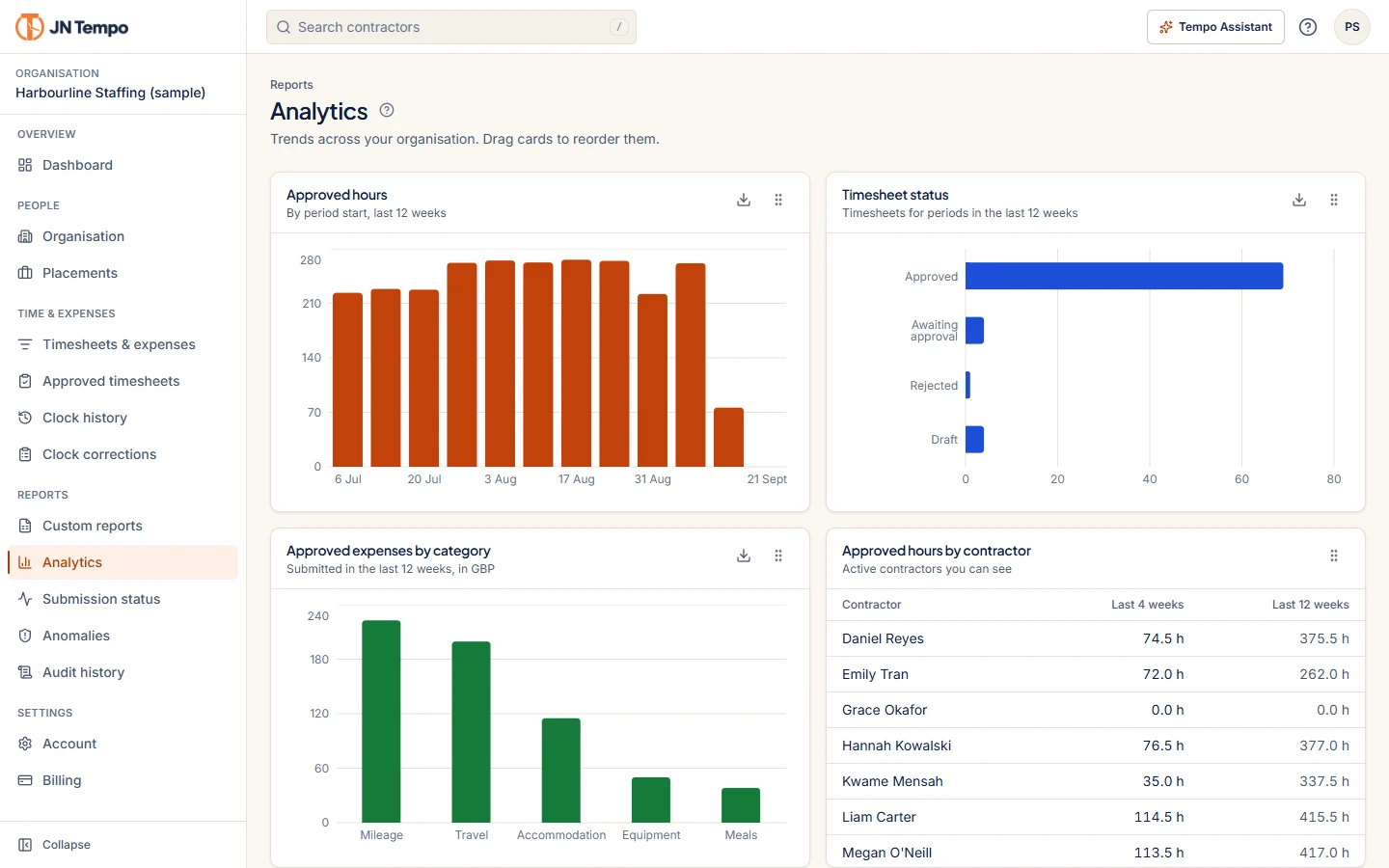
A useful layout follows the order in which a manager thinks. First the headline numbers, such as approved hours for the period, timesheets outstanding and expenses awaiting review. Then trends, showing how this period compares with recent ones. Then a clear list of what needs action now.
Action items work best when each one leads straight to the thing that needs doing, so a manager can move from the dashboard to the approval without hunting for it.
JN Tempo dashboards are statistics first and follow this order, with key figures at the top, trends below and items needing action after that. Admins and managers can arrange their own widgets, so a manager who mainly approves expenses can put that first.
Every figure should say what it counts
The fastest way to lose trust in a dashboard is a number that means different things to different people. Does 'hours this month' include submitted but unapproved time? Does 'outstanding' mean not submitted, or submitted but not approved? When managers have to ask, they stop relying on the figure.
Label each figure with exactly what it counts and over what period. In JN Tempo each dashboard figure states what it counts, which removes much of that ambiguity. If you build your own dashboards elsewhere, add a short description to every number.
Totals across currencies deserve special care. Adding pounds and euros into one figure produces a number that means nothing, so keep totals separate by currency, as JN Tempo does in its totals and exports.
Show only the manager's own contractors
A manager does not need to see every contractor in the organisation. Showing only the people assigned to them keeps the dashboard focused and limits who can see information such as pay and expenses. Admins can still see the wider picture.
Role based visibility is worth checking in any contractor management software. In JN Tempo, managers work from an approval queue and exports limited to their assigned contractors, while admins see the whole organisation.
This matters for cover too. When a manager is away, decide whether another manager temporarily takes on their contractors, so approvals do not stall and the cover manager's dashboard shows the right people.
Use trends to spot problems early
Trends are where dashboards earn their place. A gradual rise in a contractor's weekly hours might mean extra work that needs a conversation with the client or a PO extension. A sudden drop might mean someone has stopped recording time, not stopped working.
JN Tempo analytics show approved hours, pay and expenses by week, contractor and placement. Looking at them weekly, rather than only at month end, gives managers time to act on what they see.
Avoid dashboard clutter
More widgets do not make a better dashboard. Each one should answer a question someone actually asks. A practical test is to ask a manager to talk through their dashboard in under a minute. Anything they skip over without comment is a candidate for removal, and anything they have to explain at length probably needs a clearer label.
Common signs that a dashboard needs trimming include the following.
- Widgets nobody can explain.
- Several charts showing the same figure in different ways.
- Totals that mix currencies.
- Figures that are always zero.
- Anything that needs scrolling before the action list appears.
Where dashboards are heading
As part of the V2.0.0 rollout, JN Tempo is adding AI assistance on role aware dashboards, so what appears depends on whether you are an admin, manager or contractor. This is being rolled out in stages and is not yet listed on the live product site.
Whatever tools you use, review your dashboard with managers every few months and remove anything they no longer look at. To see a statistics first dashboard in practice, start a 14 day free trial at jntempo.jnhorizon.com.
See how JN Tempo handles it
Timesheets, approvals, expenses and reporting for teams that work with contractors.