What Is JN Tempo? Contractor Time and Billing in One Place
An overview of JN Tempo, the browser based tool from JN Horizon that brings contractor timesheets, approvals, expenses and reporting into one shared record.

Most agencies that place contractors end up running time and billing across several places at once. Hours arrive by email, approvals happen in message threads, expenses sit in a separate folder and the person preparing invoices has to piece it all together at the end of each week or month. JN Tempo is built to replace that patchwork with one shared record that contractors, managers and admins all work from.
JN Tempo is a product from JN Horizon Ltd, and was previously called JN Times. It runs in the browser on phones, tablets and computers, so there is nothing to install. This article explains who it is for, what it does today, and what is being added as part of the V2.0.0 rollout.
Who JN Tempo is for
JN Tempo is designed for recruitment agencies and for any team that engages contractors and needs to track their time, approve it and pass accurate figures on to payroll or billing. That might be a small agency with a handful of placements or a growing team managing dozens of contractors across several clients.
There are three roles. Admins set up the organisation, invite people and control settings. Managers approve timesheets and expenses for the contractors assigned to them. Contractors record their hours, clock in and out, and submit expense claims. Each role sees what it needs and nothing more, which keeps screens simple and limits who can see sensitive information.
Timesheets, clocking and approvals
Timesheets can be weekly or monthly, with the period set per placement, so a contractor on a monthly arrangement is not forced into a weekly rhythm. Hours are recorded by day and by project. Contractors who prefer to clock in and out can do so, including breaks, and clock times are recorded by the server rather than typed in by hand.
Each manager has one approval queue. They can approve a timesheet or return it with a reason, and the contractor is told by email either way. If a clock time is wrong, the contractor requests a correction with a reason and the manager approves or rejects it, with every change kept in the history. Submission status shows who has and has not submitted for the period, and one click reminders help chase the gaps.
Expenses, dashboards and reporting
Expense claims sit alongside timesheets. Contractors choose a category, enter the amount and upload a receipt, and the same manager who approves their timesheets reviews the claim. That keeps the approval chain predictable for everyone.
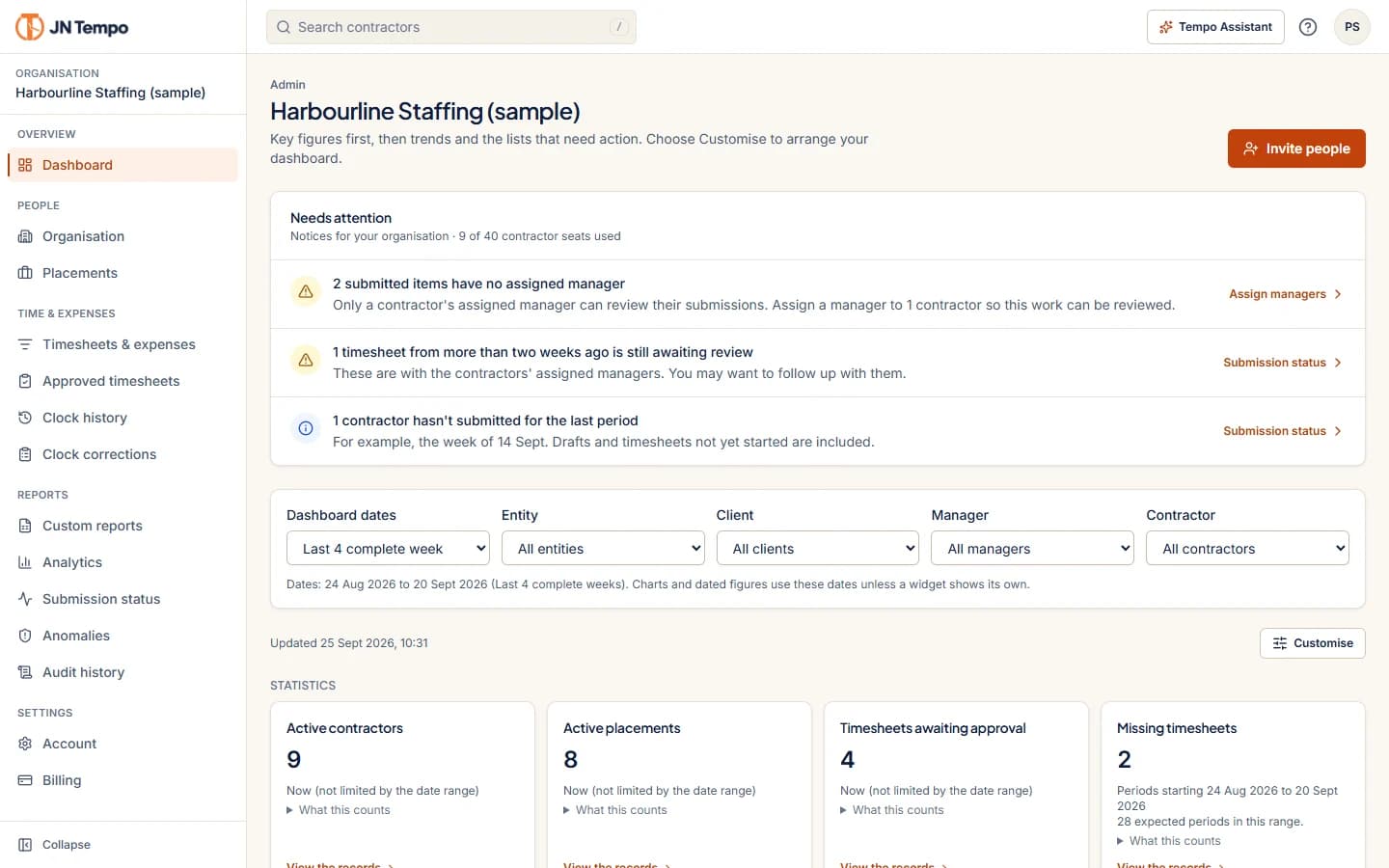
Dashboards are statistics first. Key figures appear at the top, then trends, then the items that need action. Admins and managers can arrange their own widgets, and each figure states what it counts so there is no guessing. Analytics show approved hours, pay and expenses by week, contractor and placement.
For deeper work, filters, totals and saved views let you slice records by person, client, placement, status, dates and amounts, with totals kept separate by currency. Custom reports let you choose a dataset, columns, filters and grouping, preview the result and export it to Excel or PDF. CSV exports are available for payroll.
Onboarding, records and security
Admins invite people by email and can see delivery status, resend or revoke invitations. Invitees complete self onboarding on any device, with progress saved as they go. The role, organisation and assignments chosen by the admin cannot be changed by the invitee, and invitation links work once and then expire.
Admins can keep placement records showing engagement type, payment arrangement and IR35 status, visible only to admins and with a change history. JN Tempo records this information for your own reference. It does not work out, suggest or certify anyone's status. HMRC guidance places responsibility for the status determination with the client in most cases, or with the worker's intermediary where the client is a small business outside the public sector, so take professional advice where you need it.
An audit log records submissions, approvals, rejections and changes to contractors and placements, and admins can export it. Organisation records are separated using row level security, and card payments are handled on Stripe's own pages, so JN Tempo does not store card numbers.
What is being added in the V2.0.0 rollout
V2.0.0 went live on 29 September 2026 as the first release under the JN Tempo name, adding Excel and PDF exports, guided tours for each role, help buttons beside the trickier settings and server recorded clock corrections. Further features are being rolled out as part of V2.0.0 and are not yet listed on the live product site. They are planned rather than finished.
- Purchase order tracking, with POs linked to contractors and placements, PDF attachments, remaining balances and expiry warnings.
- Contractor billing on weekly or monthly schedules, with approved hours, approver details, rates, currencies, totals and optional PO references.
- Validated Xero compatible billing export files, prepared for import into your accounting software.
- Limited company details, optional bank details with restricted access, and expanded profiles with contract dates.
- AI assistance on role aware dashboards, and the ability to invite additional admins.
Pricing and getting started
JN Tempo costs £79 per month billed monthly, or £799 per year billed annually, and both plans include 20 contractor accounts. Extra capacity is £25 per month for each pack of 20 contractors. There is a 14 day free trial with no card needed to start, and you can cancel any time from the Billing page.
If you want to see how it fits your own process, the simplest step is to start a trial and invite one manager and a couple of contractors. You can find everything at jntempo.jnhorizon.com.
See how JN Tempo handles it
Timesheets, approvals, expenses and reporting for teams that work with contractors.